5回表示 · 0回ダウンロード
Daddy Pigeon
ダウンロード
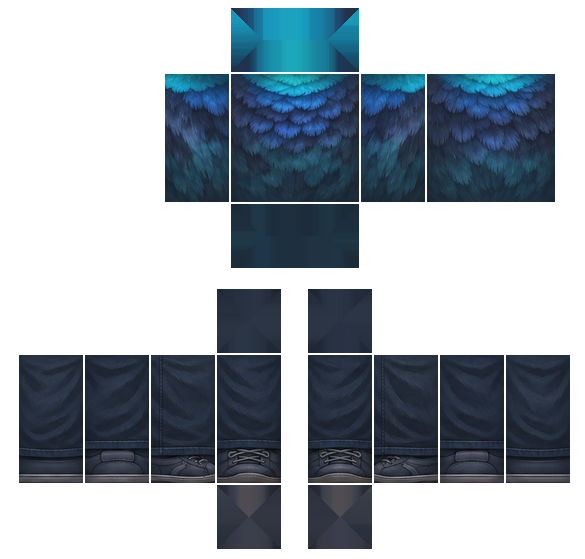
Robloxのクラシックテンプレート形式のPNGが2枚。片方だけでも両方でもアップロードできるよ。
Robloxで着る方法
- 1クリエイターハブを開いて、Avatar Items → Classicsに進もう。
- 2シャツ、パンツ、Tシャツのどれかを選んで、ここからダウンロードした対応するPNGをアップロードしよう。
- 3名前をつけてアップロード料金を払おう:1アイテムにつき80 Robux。
- 4Robloxの審査が終わったら、インベントリで見つけて着てみよう。
アップロードには本人確認済みのRobloxアカウントが必要だよ。アイテムを販売するにはPlusかPremiumが必要。
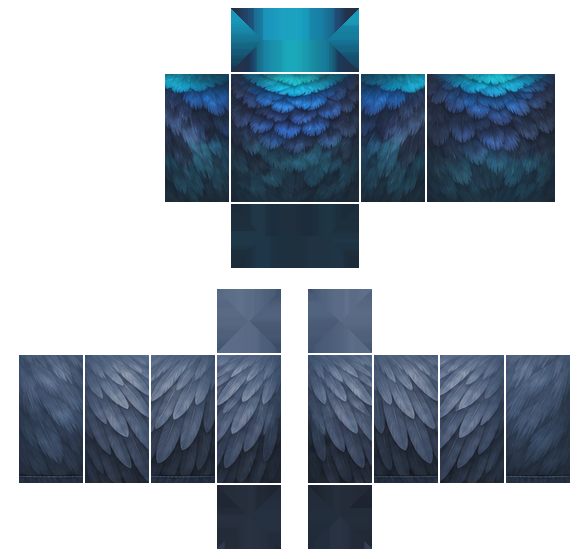
The torso has dark slate feathered wings on the sleeves and a blue-to-teal feather pattern across the chest, fading from bright cyan at the shoulders to deep teal lower down. The back repeats the feather pattern, and navy feathered pants pair with dark laced boots.
カテゴリー
コメント 1

Who is this?